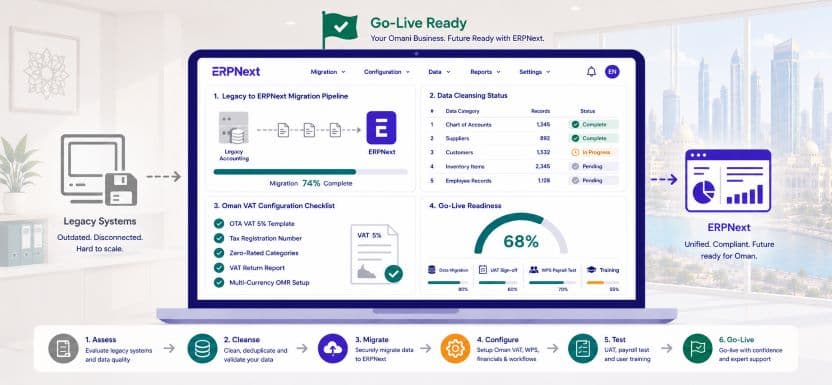
Migrate to ERPNext Oman: Master Your Switch from Legacy Accounting Software
Anonymous
Migrate to ERPNext Oman is a decision thousands of Omani businesses are making right now as the limitations of legacy accounting tools become impossible to ignore. Whether your business currently runs on QuickBooks, Sage, Tally, Peachtree, or a locally built accounting system, the same pattern emerges at a certain point in growth: the software cannot handle Oman VAT the way the Oman Tax Authority requires, WPS payroll file generation is manual and error-prone, multi-currency transactions in OMR require workarounds, and management reporting means exporting to Excel and spending hours building tables that should already exist in the system.
This guide walks you through every phase of migrating to ERPNext in Oman, from the decision to move through to your first clean month of live operations, with practical guidance built around how Omani businesses actually work.
Why Omani businesses decide to migrate to ERPNext now
The trigger for the decision to migrate to ERPNext Oman is rarely a single event. It is usually the accumulation of several compounding frustrations reaching a tipping point simultaneously. The VAT return takes three days to prepare manually because the legacy system does not produce an OTA-formatted report. The payroll team spends four hours every month reformatting salary data into a WPS-compliant SIF file that the accounting software cannot generate automatically. The operations director asks for a real-time stock report and receives an Excel file that is already two days old. A new branch opens in Sohar and suddenly the finance team is reconciling two separate accounting systems at month-end.
Each of these problems is individually manageable. Together, they represent a significant drain on staff time, a growing compliance risk, and a ceiling on how efficiently the business can scale. Migrating to ERPNext removes all of them from a single implementation.
What migrate to ERPNext Oman actually involves: a realistic overview
Before committing to the migration, Omani business owners and finance directors need a clear picture of what the process actually involves. A migration from legacy accounting software to ERPNext is not simply a data export and import exercise. It involves four parallel workstreams that must be managed simultaneously: configuring ERPNext correctly for Omani regulatory requirements, extracting and cleansing data from the legacy system, training staff on new workflows, and running the legacy system and ERPNext in parallel until the new system is verified and trusted.
The realistic timeline for a well-managed migrate to ERPNext Oman project for a Muscat-based SME with 20 to 100 employees is eight to fourteen weeks from kickoff to full go-live. Businesses that attempt to compress this timeline below eight weeks almost always pay for the shortcut in configuration errors, dirty data, and user adoption problems that take months to resolve.
| Migration Phase | Duration | Primary Output |
| Legacy system audit and data export | 1 to 2 weeks | Clean data extract and gap analysis |
| ERPNext configuration for Oman | 2 to 3 weeks | Fully configured sandbox environment |
| Data cleansing and import | 1 to 2 weeks | Verified master data in ERPNext |
| Opening balances and cutover prep | 1 week | Agreed opening balance sheet |
| User acceptance testing | 1 to 2 weeks | Signed UAT sign-off |
| Staff training | 1 week | All users trained by role |
| Parallel run | 2 to 4 weeks | Verified outputs matching legacy |
| Go-live and legacy decommission | 1 week | ERPNext live, legacy retired |
Step 1: Audit your legacy system before you migrate to ERPNext Oman
The single most valuable investment in any ERPNext migration is the pre-migration audit of the legacy system. This audit has two objectives: understanding what data needs to move to ERPNext and identifying which legacy processes should be improved rather than replicated.
Most Omani businesses that have been running on legacy accounting software for three or more years have accumulated significant data quality problems. Duplicate supplier records with slightly different names. Customer accounts with missing TRN numbers. Inventory items with inconsistent naming conventions. Payroll records with joining dates that do not match employment contracts. Opening balances that were never properly reconciled when the legacy system was first set up years ago. If any of this dirty data migrates into ERPNext unchanged, the new system inherits every problem the old system created.
The audit produces a data quality report that identifies every cleanup task required before migration begins. This is unglamorous work, but it is the single most important factor in determining whether the migrate to ERPNext Oman project delivers a clean, trustworthy system from go-live day one.
Step 2: Configure ERPNext for Omani regulatory requirements
Before a single byte of legacy data is imported, ERPNext must be fully configured for Oman’s regulatory environment. This configuration phase covers six critical areas that are specific to Omani businesses and cannot be skipped or deferred to post-go-live.
Oman VAT configuration
Navigate to Accounts then Tax Templates and create the Oman Output VAT 5% and Oman Input VAT 5% templates. Enter your Tax Registration Number in Company Settings under Tax ID. Configure zero-rated and exempt tax categories for any goods or services your business supplies that do not attract the standard 5% rate. Activate the OTA-formatted VAT return report and run it against sample transactions to verify the output matches the format required for submission. The migrate to ERPNext Oman VAT configuration must be tested and verified before any live transactions are posted because correcting VAT misconfigurations after real data exists in the system is significantly more complex.
Omani Rial base currency and multi-currency setup
Set OMR as the company base currency in Company Settings before any data is imported. This step cannot be changed after transactions are posted. If your business transacts in USD, AED, EUR, or other currencies, create foreign currency bank accounts for each and configure exchange rate update rules. For import-heavy Omani businesses, activate the landed cost tracking module and map freight, customs duty, and port handling charge categories to the correct inventory valuation accounts.
WPS payroll and Labour Law configuration
Configure the payroll module with WPS bank details for every employee, salary components mapped to the correct GL accounts, Omani Labour Law leave entitlements by contract type and nationality, end-of-service gratuity rules for Omani national and expatriate categories, and Omanisation ratio dashboards. Test the WPS SIF file generation against sample payroll data and verify the output format matches your bank’s WPS portal requirements before the first live payroll run.
Configuration warning: Businesses that attempt to migrate to ERPNext Oman and configure VAT, payroll, and multi-currency simultaneously with data migration almost always experience delays. Configure and test the regulatory setup in a clean sandbox environment first, then begin data migration into a verified system.
Step 3: Extract, cleanse, and prepare legacy data for migration
With ERPNext configured and tested in the sandbox, the data migration workstream begins in parallel. The standard sequence for a migrate to ERPNext Oman data migration covers five data categories in strict order.
Chart of accounts and opening balances must be migrated first. Export your trial balance from the legacy system as at the agreed cutover date. Map each legacy account code to the corresponding ERPNext account in your configured chart of accounts. Import the opening balances and verify that ERPNext produces a balance sheet that matches the legacy system exactly before proceeding to any other data category.
Customer and supplier master records are migrated second. Before importing, deduplicate all records, standardise naming conventions, verify TRN numbers against OTA records, and confirm payment terms and currency assignments for every international supplier. A Muscat trading company with 200 supplier records typically discovers 15 to 30 duplicates and 20 to 40 missing TRN fields during this cleansing exercise.
Inventory item master and opening stock are migrated third. Every item code, description, unit of measure, reorder level, and preferred supplier assignment must be verified before import. Opening stock quantities should be confirmed through a physical count conducted on the cutover date rather than relying on legacy system figures, which are frequently inaccurate due to unrecorded adjustments.
Employee records are migrated fourth, covering joining dates, nationality, basic salary, allowance structure, leave balances, and WPS bank account details for every active employee. End-of-service gratuity accruals calculated from the joining date must also be entered as opening balances in the provision account.
Open transactions are migrated last. These include unpaid supplier invoices outstanding as at the cutover date, outstanding customer invoices, and active purchase orders that have not yet been fully received and invoiced. Only genuinely open transactions should be migrated. Paid invoices and completed orders remain in the legacy system as historical records.
Use ERPNext’s import tool with CSV templates for each data category rather than attempting manual entry. The import tool validates data against configured rules before posting, catching errors before they enter the live system rather than after.
Step 4: Opening balance verification and cutover preparation
Before any user logs into ERPNext for live transactions, the finance manager must sign off on a formal opening balance verification. This sign-off confirms that the ERPNext balance sheet as at the cutover date matches the legacy system trial balance to the last OMR, that all open invoices in ERPNext match the aged debtor and aged creditor reports from the legacy system, and that opening stock valuations in ERPNext match the physical count conducted at cutover.
This verification is not a formality. It is the moment that establishes whether the migrate to ERPNext Oman project has produced a trustworthy starting point or whether it has imported errors that will compound with every subsequent transaction. Any discrepancy identified at this stage must be investigated and resolved before go-live proceeds. For a full overview of ERPNext financial capabilities for Omani businesses, visit our ERPNext implementation guide for Omani businesses.
Step 5: User acceptance testing specific to Omani workflows
User acceptance testing for a migrate to ERPNext Oman project must cover every workflow that is specific to Oman’s regulatory environment, not just generic ERP functionality. The UAT checklist must include:
- Raise a supplier invoice in USD and verify the OMR equivalent is calculated at the correct exchange rate with VAT posted to the correct OTA account
- Run the monthly payroll and verify the WPS SIF file generates in the format accepted by your Muscat bank’s WPS portal
- Run the quarterly VAT return report and verify the output VAT, input VAT, and net payable figures match a manually calculated control total
- Process an employee separation and verify ERPNext calculates the end-of-service gratuity correctly under the applicable Omani Labour Law scenario
- Run the Omanisation ratio report and verify headcount and nationality figures match the HR records imported during migration
Every test that fails is logged, fixed, and retested before UAT sign-off. No migrate to ERPNext Oman project should proceed to go-live with outstanding UAT failures against any Oman-specific compliance workflow.
Step 6: Parallel run and go-live
The parallel run phase is the final validation before the legacy system is retired. For two to four weeks, every transaction is processed in both systems and the outputs are compared. The parallel run is particularly important for migrate to ERPNext Oman projects because it validates that the VAT calculation, payroll output, and stock valuation in ERPNext match what the legacy system would have produced for the same transactions.
Go-live should be scheduled at the start of a new month to create a clean accounting period boundary. On go-live day, the legacy system is locked for new transactions, ERPNext opens the new period, and all staff begin transacting exclusively in ERPNext. The implementation partner should be available for the full first week of live operations to resolve any questions that arise from real transactions that the training scenarios did not fully cover.
Common migrate to ERPNext Oman mistakes and how to avoid them
- Migrating dirty legacy data without cleansing, then spending months correcting errors in the live system
- Configuring VAT after data migration rather than before, creating unposted VAT on historical transactions
- Skipping the parallel run to save two to four weeks, then discovering configuration errors only after the legacy system has been retired
- Not testing the WPS SIF file format before the first live payroll run, risking a Ministry of Manpower compliance breach
- Attempting to migrate all historical transaction history rather than just opening balances and open items, which creates unnecessary complexity and import errors
- Going live at year-end or quarter-end rather than at the start of a clean period, complicating the first VAT return
Master your migrate to ERPNext Oman project with the right approach
Migrate to ERPNext Oman is one of the highest-ROI investments a growing Omani business can make, but only when the migration is planned and executed correctly. The businesses that follow the phased approach in this guide, audit before migrating, configure before importing, cleanse before going live, and test before retiring the legacy system, arrive at go-live with a trustworthy, fully compliant ERPNext environment that delivers immediate value. The businesses that rush the process inherit digital versions of the same problems they were trying to solve.
Contact Gazelle today for a free legacy system audit and migration assessment tailored to your Omani business, covering your current accounting software, data quality, and the fastest path to a clean ERPNext go-live.