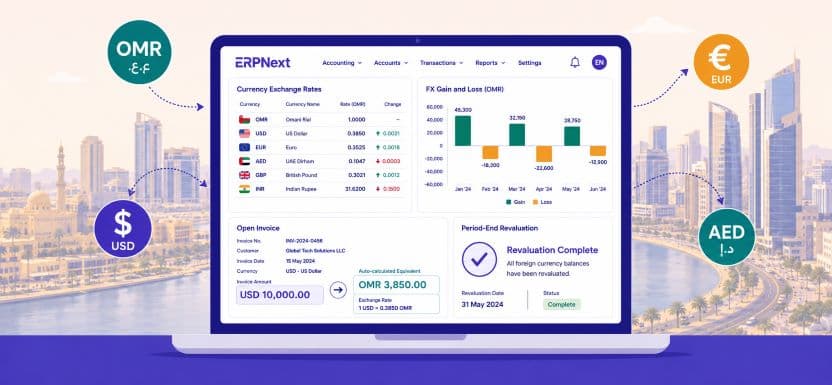
Multi-Currency Omani Rial ERPNext: Master Multi-Currency Transactions for Omani Businesses
Anonymous
Multi-currency Omani Rial ERPNext management is a daily operational reality for thousands of businesses across the Sultanate. Whether your company imports goods from Asia and Europe, pays subcontractors in AED or USD, bills international clients in foreign currencies, or simply needs your financial statements to reflect the true OMR value of every transaction, getting multi-currency accounting right is non-negotiable. Manual FX calculations, spreadsheet-based reconciliations, and end-of-month exchange rate adjustments cost Omani finance teams enormous amounts of time and introduce errors that distort your profit and loss, inflate your VAT liability, and misrepresent your cash position. This guide explains exactly how ERPNext automates and manages every aspect of multi-currency transactions with the Omani Rial as the base reporting currency.
Why multi-currency Omani Rial ERPNext management matters for Omani businesses
The Central Bank of Oman maintains the Omani Rial at a fixed peg against the US Dollar, giving Omani businesses a stable base rate for USD-denominated transactions. However, the full range of currencies that active Omani trading, services, and manufacturing companies handle daily extends well beyond USD. European equipment imports arrive in EUR or GBP. GCC trade is often settled in AED or SAR. Indian subcontractors’ invoices in INR. Chinese machinery suppliers’ prices in CNY. Each of these currencies moves independently against OMR, creating realised and unrealised foreign exchange gains and losses that must be accurately captured in your accounts.
Multi-currency Omani Rial ERPNext handles all of this automatically, posting the correct OMR equivalent for every transaction, tracking outstanding foreign-currency balances, and generating FX gain or loss journal entries without any manual intervention from your finance team.
| OMR is pegged at 1 OMR to 2.597 USD, creating predictable FX base rates for Omani businesses | 65% of Omani SMEs dealing in imports or exports report FX reconciliation as a top finance pain point | 3 GL entries generated automatically by ERPNext per multi-currency transaction: base, foreign, and gain or loss | Zero manual FX calculations needed when ERPNext exchange rate automation is fully configured |
Common currencies managed alongside the Omani Rial in ERPNext
The table below shows the currencies most frequently configured in ERPNext deployments for Omani businesses and their typical business use cases.
| China’s manufactured goods and machinery imports | Currency | Common Use Case for Omani Businesses |
| USD | US Dollar | Oil and gas, international trade, USD-invoiced suppliers |
| EUR | Euro | European equipment imports, consultancy services |
| GBP | British Pound | UK-based contractors, engineering firms |
| AED | UAE Dirham | GCC trade, Dubai-sourced goods and logistics |
| INR | Indian Rupee | Indian subcontractor payments, IT services |
| SAR | Saudi Riyal | Cross-border Saudi trade and logistics |
| CNY | Chinese Yuan | China manufactured goods, machinery imports |
| OMR | Omani Rial | Base reporting currency, all domestic transactions |
How to set up multi-currency Omani Rial ERPNext: step by step
Configuration: getting ERPNext ready for OMR multi-currency operations
Step 1: Set the Omani Rial as the default company currency
The first and most critical step in any multi-currency Omani Rial ERPNext configuration is locking Omani Rial as your company’s base currency in Company Settings. Every transaction entered in any foreign currency will be automatically converted to OMR using the exchange rate active at the transaction date. All financial reports, including the profit and loss statement, balance sheet, and VAT return, will present figures in OMR regardless of the currency in which the original transaction occurred.
Important: The company’s base currency cannot be changed after transactions are posted. Always confirm OMR is set before entering any live data into your ERPNext system.
Step 2: Enable and configure the currencies you transact in
Navigate to Accounts, then Currency List in ERPNext, and enable every currency your business actively uses. For each currency, you can set a default exchange rate or connect ERPNext to live exchange rate feeds. Omani businesses transacting in USD benefit from the stability of the OMR peg, but EUR, GBP, AED, INR, and CNY rates fluctuate daily and should be updated regularly to maintain accurate financial reporting. ERPNext supports both manual rate entry and automated rate imports from public exchange rate APIs.
Step 3: Create foreign currency bank accounts
If your business holds USD, AED, or other foreign currency accounts at a bank in Oman, create a separate bank account ledger in ERPNext for each currency. This allows ERPNext to track the actual foreign-currency balance in each account separately from the OMR equivalent, and to calculate unrealised FX gains or losses when you run period-end revaluation. Multi-currency Omani Rial ERPNext bank reconciliation then reflects both the foreign-currency statement balance and the OMR equivalent simultaneously.
Step 4: Configure customers and suppliers with their transaction currencies
Each customer and supplier in ERPNext can be assigned a default transaction currency. A UAE-based client defaults to AED. A European equipment supplier defaults to EUR. When an invoice is raised for that party, ERPNext automatically applies their currency and the current exchange rate, calculates the OMR equivalent, and records both values on the invoice. Your Omani team sees the invoice in the customer’s currency while the accounting system posts the correct OMR figure to the ledger without any manual conversion.
Foreign exchange gain and loss accounting with ERPNext in Oman
Automatic FX variance posting: how ERPNext handles the difference
Realised FX gains and losses on settlement
When an invoice is raised in a foreign currency, and payment arrives at a different exchange rate, the difference between the invoiced OMR value and the received OMR value is a realised foreign exchange gain or loss. Multi-currency Omani Rial ERPNext posts this variance automatically to a dedicated FX gain or loss account in your chart of accounts the moment the payment is recorded. There is no manual journal entry required and no risk of the variance being missed or posted to the wrong account.
The example below shows how ERPNext handles a USD invoice paid 30 days later at a slightly different OMR rate:
| Event | USD Amount | OMR Rate | OMR Value | FX Variance |
| Invoice raised to UAE client | USD 10,000 | 0.385 | OMR 3,850 | Baseline |
| Payment received 30 days later | USD 10,000 | 0.381 | OMR 3,810 | OMR 40 loss posted automatically |
| ERPNext journal entry created | Auto-generated | No manual entry | GL updated instantly | Realised FX loss: OMR 40 |
Unrealised FX gains and losses on open balances
At the end of each accounting period, any unpaid foreign currency invoices or outstanding foreign currency bank balances represent unrealised FX exposure. ERPNext’s period-end revaluation tool recalculates the OMR equivalent of every open foreign-currency balance using the closing exchange rate and posts unrealised gain or loss entries to the appropriate accounts. This ensures your balance sheet always reflects the true OMR value of your foreign-currency assets and liabilities, a requirement for accurate financial reporting and Oman Tax Authority compliance.
Finance tip: Run the ERPNext currency revaluation tool at the end of every quarter before preparing your VAT return. This ensures your OMR receivables and payables balances are accurate and your input or output VAT calculations are based on correct OMR figures.
Multi-currency Omani Rial ERPNext and VAT compliance
VAT on foreign currency invoices
Omani VAT must be calculated and reported in Omani rials regardless of the currency in which the invoice is issued. ERPNext handles this automatically on every foreign-currency sales invoice and purchase invoice. The VAT amount is calculated on the OMR equivalent of the transaction value at the invoice date exchange rate, and this OMR VAT figure flows directly into the OTA-formatted VAT return report. Omani businesses invoicing international clients in USD or AED do not need to perform any manual VAT conversion. ERPNext calculates, posts, and reports the correct OMR VAT figure without any additional steps.
Input VAT on foreign currency supplier invoices
When your Omani business receives a supplier invoice in a foreign currency, ERPNext applies the transaction-date exchange rate to calculate the OMR equivalent and derives the input VAT claim in OMR from that figure. This is particularly important for import-heavy businesses such as trading companies, construction contractors, and oil and gas service providers, where a significant portion of input VAT comes from international supplier invoices. The multi-currency Omani Rial ERPNext VAT reconciliation report shows all input and output VAT in OMR, ready for OTA submission. For a complete guide to ERPNext VAT compliance in Oman, visit our ERPNext VAT and compliance guide for Omani businesses.
Multi-currency reporting and financial statements in OMR
Financial visibility: OMR reporting across all foreign currency activity
Profit and loss and balance sheet in Omani Rial
Every financial report in ERPNext presents figures in OMR, even when the underlying transactions occurred in multiple foreign currencies. Your monthly profit and loss statement, quarterly balance sheet, and annual accounts all consolidate USD revenues, EUR costs, AED receivables, and INR payments into a single OMR view. Multi-currency Omani Rial ERPNext reporting gives Omani business owners and finance directors the clean, currency-unified financial picture they need for decision-making, bank submissions, and statutory reporting.
Foreign currency outstanding reports
ERPNext provides dedicated aged debtor and aged creditor reports that show outstanding balances in both the foreign currency and the current OMR equivalent side by side. An Omani trading company with USD receivables from three different clients and EUR payables to two European suppliers can see the full FX exposure at a glance, updated to the latest exchange rate, without exporting to a spreadsheet or calling the bank for a rate check.
Setting up multi-currency Omani Rial ERPNext: a practical checklist
Use this checklist when configuring ERPNext multi-currency for your Omani business:
- Set OMR as the company base currency in Company Settings before entering any transactions.
- Enable all transactional currencies in the Currency List and set initial exchange rates.
- Create separate bank account ledgers in ERPNext for each foreign currency account your business holds.
- Assign default transaction currencies to all foreign customers and suppliers in their master records.
- Configure FX gain and FX loss accounts in your chart of accounts under other income and other expenses.
- Set up a recurring monthly or quarterly reminder to run the currency revaluation tool before period-end closing.
- Verify that VAT return reports present all figures in OMR before the first OTA filing period after go-live.
Pro tip: Connect ERPNext to a public exchange rate API such as ExchangeRate-API or Open Exchange Rates to automate daily rate updates. This removes the manual rate entry task from your finance team and ensures every transaction uses the correct market rate.
Conclusion: master multi-currency Omani Rial transactions with ERPNext
Multi-currency Omani Rial ERPNext management eliminates the most time-consuming and error-prone manual tasks in Omani business finance: FX conversion on invoices, realised gain or loss journal entries, period-end balance revaluation, and VAT calculation on foreign-currency transactions. Once correctly configured, ERPNext handles every one of these tasks automatically, giving your finance team accurate OMR financials in real time and your leadership team the currency-unified reporting they need to make confident business decisions.
Whether your Omani business transacts in two currencies or twelve, ERPNext scales to handle the full complexity of your foreign exchange environment without additional modules, external tools, or manual workarounds.
Contact Gazelle today for a free ERPNext multi-currency configuration session tailored to your Omani business’s specific foreign-currency needs.