ERPNext Retail Oman POS: Master Unified Store and Back-Office Operations for Omani Retailers
Anonymous
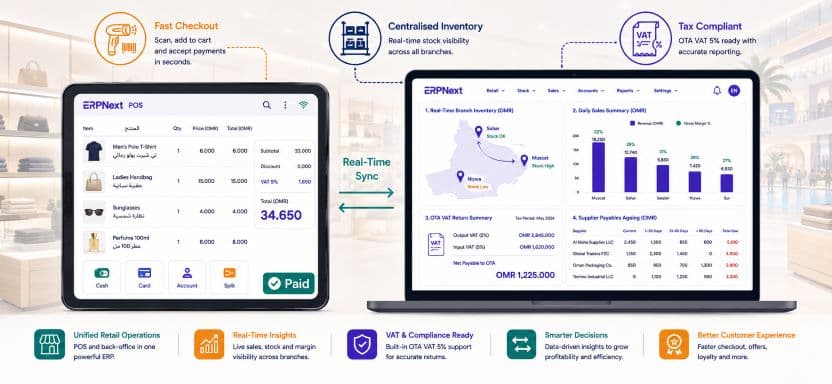
ERPNext retail Oman POS integration is transforming how retail businesses across the Sultanate manage the gap between what happens at the checkout counter and what appears in the finance system. Omani retailers, from independent pharmacies and electronics shops in Muscat’s Qurum district to multi-branch supermarkets and fashion retailers operating across Ruwi, Al Khuwair, and Sohar, all face the same structural problem: their point of sale system and their back-office accounting live in separate worlds.
Sales are rung up at the till, but inventory does not update until someone runs a report. VAT is collected from customers but reconciled manually days later. Cash differences between the POS and the bank deposit are investigated through handwritten till receipts. The Ministry of Commerce, Industry and Investment Promotion continues to push for retail sector formalisation and digital compliance, and the gap between how most Omani retailers operate and what regulators expect is widening. ERPNext closes that gap entirely. This guide explains how.
Why ERPNext retail Oman POS unification matters for Omani retailers
The disconnection between POS and back-office is not simply an inconvenience. It is a source of financial inaccuracy that compounds with every transaction. When a sale at a Muscat electronics retailer is processed through a standalone POS terminal, four things should happen simultaneously: the customer’s invoice is generated with correct VAT, the inventory level of the sold item decreases, the revenue is posted to the correct GL account, and the cash or card payment is recorded in the finance system. In a disconnected environment, only the first step happens automatically. The other three happen manually, hours or days later, when someone has time to update the back-office system. Errors introduced in that manual transfer accumulate into stock discrepancies, VAT mismatches, and financial reports that do not reflect trading reality.
ERPNext retail Oman POS eliminates the manual transfer entirely. Every transaction at the POS terminal posts simultaneously to inventory, the GL, and the VAT ledger in real time.
Key retail performance improvements with ERPNext POS:
- 80% reduction in end-of-day cash reconciliation time compared to manual till-to-system processes
- Real-time inventory accuracy across all branch locations from the moment of each sale
- VAT-compliant tax invoices generated automatically at the point of sale for every transaction
- Zero manual data entry between POS and back-office accounting after ERPNext go-live
How ERPNext retail Oman POS works: the unified transaction flow
Point of sale interface for Omani retail staff
The ERPNext POS interface is designed for retail speed. A cashier in an Omani pharmacy, electronics store, or fashion outlet opens a POS session, selects items by barcode scan or search, applies any configured discount or promotion, selects the payment method, and closes the transaction. The interface supports touchscreen operation, barcode scanner integration, receipt printer connection, and cash drawer management. Arabic and English item descriptions display simultaneously, and the receipt prints in both languages with the retailer’s Tax Registration Number and the correct VAT breakdown as required by Omani VAT regulations.
The entire transaction takes the same amount of time as any modern retail checkout. The difference is what happens behind the scenes the moment the sale is confirmed.
Real-time back-office posting from every POS transaction
The moment a sale is completed in the ERPNext retail Oman POS, four automatic back-office entries occur without any human intervention. The inventory level of every sold item decreases by the quantity sold at the branch warehouse location. The revenue amount posts to the correct income account in the chart of accounts by product category. The VAT amount posts to the output VAT liability account for inclusion in the next OTA return. The payment amount posts to the correct settlement account, whether cash, card, or customer account credit. By the time the cashier hands the customer their receipt, the finance system already reflects the transaction completely and accurately.
| POS Transaction Event | ERPNext Back-Office Action | Timing |
| Item scanned and added to sale | Inventory reservation created | Instant |
| Sale confirmed | Stock level reduced at branch warehouse | Instant |
| Payment received | GL revenue entry posted by category | Instant |
| VAT collected | Output VAT ledger updated for OTA return | Instant |
| Cash payment | Cash account balance updated | Instant |
| Card payment | Card clearing account entry created | Instant |
| Receipt printed | Customer invoice archived in ERPNext | Instant |
| Shift closed | Daily sales summary posted to accounts | End of shift |
Inventory management across Omani retail branches with ERPNext
Real-time stock visibility across all store locations
ERPNext retail Oman POS inventory management gives retail operations managers and buyers a live view of stock levels across every branch simultaneously. A fashion retailer with five outlets across Muscat, Sohar, and Nizwa can see the exact quantity of every SKU at every location from a single dashboard without calling store managers or waiting for nightly stock extracts. When a customer at the Qurum branch asks for a size that is out of stock, the sales associate can check ERPNext in real time, confirm that the Al Khuwair branch has the item, and arrange a branch transfer or customer order without leaving the till area.
Automatic reorder and centralised buying
When any branch stock level falls below the configured minimum, ERPNext generates a purchase request automatically and routes it to the central buying team for supplier order placement. This automated reorder capability eliminates the stock-out situations that arise when store managers forget to raise replenishment requests, or raise them too late for the supplier lead time to be met. The central buying team manages supplier relationships, negotiates pricing, and raises purchase orders from the ERPNext procurement module, which feeds directly into the inventory receiving workflow at each branch.
Inter-branch stock transfers with full approval workflow
Retail businesses with multiple Omani locations frequently need to balance stock between branches to match demand patterns. ERPNext inter-branch transfer workflow allows a store manager to raise a transfer request digitally, the operations manager approves it, and both the sending and receiving branch inventory updates the moment the transfer is confirmed. There is no phone call, no WhatsApp message, and no manual stock adjustment. The audit trail is complete, and both branch inventory records are accurate at all times.
ERPNext retail Oman POS inventory accuracy across multi-branch Omani retailers improves from an industry average of 70 to 80% to above 95% within three months of go-live, driven primarily by the elimination of manual stock adjustment entries and the real-time posting of every POS transaction directly to branch inventory.
VAT compliance for Omani retailers with ERPNext POS
Automatic VAT on every retail transaction
Every sale processed through the ERPNext retail Oman POS applies the correct VAT treatment automatically based on the item configuration. Standard-rated items at 5% are the most common category for Omani retailers, but businesses selling a mix of standard-rated, zero-rated, and exempt items, such as pharmacies selling both taxable health products and VAT-exempt medicines, configure each item category with its correct VAT treatment in the item master. The POS applies the right rate to the right item on every transaction without the cashier needing to know or decide anything about VAT.
OTA-ready VAT reporting from retail POS data
At the end of each VAT filing period, the ERPNext VAT return report consolidates all output VAT collected through every POS terminal at every branch location into the OTA-formatted return. There is no manual aggregation of daily POS summaries, no spreadsheet compilation from multiple branch reports, and no risk that a branch’s VAT data is missed or double-counted. The VAT return reflects every retail transaction from every Omani branch location automatically, giving the finance team a report that is ready for OTA submission without any manual intervention.
Customer tax invoices for B2B retail purchases
Omani retailers frequently sell to business customers who require a full tax invoice with the buyer’s TRN for their own input VAT claim. ERPNext retail Oman POS supports switching between a standard retail receipt for individual customers and a full tax invoice for business customers within the same POS session. The cashier selects the invoice type, enters the customer TRN if required, and the system generates the correct document automatically. This capability is particularly valuable for electronics retailers, office supply stores, and hardware outlets where a significant proportion of daily transactions are B2B purchases.
Customer management and loyalty with ERPNext retail Oman POS
Customer account and credit management
ERPNext retail Oman POS supports customer account billing for corporate clients who purchase on credit terms. A corporate customer’s purchase is posted to their account receivable rather than settled immediately at the POS, and the finance team manages the monthly statement and collection process through the ERPNext accounts receivable module. Credit limits configured per customer prevent the POS from accepting account purchases beyond the approved limit, protecting the retailer from extending excessive credit to any single client.
Purchase history and customer analytics
Every purchase made by a registered customer through the ERPNext POS is stored against their customer record. Retail managers can view each customer’s purchase history, average transaction value, preferred product categories, and last visit date from the ERPNext CRM module. This purchase data drives more targeted stock purchasing decisions, informs promotional planning, and enables the commercial team to identify high-value customers who warrant personal relationship management.
Back-office financial management for Omani retailers with ERPNext
Automated daily sales reconciliation
The end-of-day cash reconciliation process in a typical Omani retail business without ERP involves the shift supervisor counting the till, calculating expected cash from a paper transaction log, identifying any difference, and manually entering the day’s totals into an accounting spreadsheet. This process takes 30 to 60 minutes per shift per branch and introduces the errors that cash handling under time pressure always creates. ERPNext retail Oman POS automates this entirely. When the POS session is closed, ERPNext generates a session summary showing expected cash, card, and accounts receivable totals broken down by payment method. The supervisor enters the actual cash count, and any difference is posted to a cash variance account automatically, with the discrepancy amount and shift details recorded for management review.
Profit and loss reporting by branch and product category
ERPNext gives Omani retail management the branch-level financial visibility that most retail businesses in the Sultanate have never had. Monthly profit and loss reports filterable by individual branch, product category, or supplier allow retail directors to identify which locations are generating the strongest margins, which product categories are underperforming, and which suppliers are delivering the best landed cost efficiency. For a complete overview of ERPNext financial reporting capabilities for Omani businesses, visit our ERPNext implementation guide for Omani businesses.
Accounts payable and supplier payment management
The back-office procurement and payables function for an Omani retailer managing 30 to 100 active suppliers involves purchase order management, goods receiving against PO, supplier invoice three-way matching, payment scheduling, and bank reconciliation. ERPNext handles every stage of this cycle from the procurement module through to payment run and bank statement reconciliation. Suppliers are paid on time according to their agreed terms, input VAT on every supplier invoice is captured for the OTA return, and the accounts payable ledger reflects the accurate outstanding position at any moment without manual compilation.
Implementing ERPNext retail Oman POS: recommended phase sequence
- Weeks 1 to 2: Configure chart of accounts in OMR, set up Oman VAT templates with standard-rated and exempt item categories, enter TRN, and configure POS settings including receipt templates in Arabic and English.
- Weeks 2 to 3: Build the item master with barcode numbers, VAT category, reorder levels, and branch warehouse assignments for every SKU in the product range.
- Weeks 3 to 4: Set up branch warehouse locations, configure inter-branch transfer workflows, and activate automatic reorder rules for fast-moving product categories.
- Weeks 4 to 5: Configure customer master for corporate account customers with credit limits, payment terms, and TRN fields. Set up supplier master with payment terms and landed cost categories for any imported product lines.
- Weeks 5 to 6: Set up POS hardware at each branch location, test barcode scanning, receipt printing, cash drawer integration, and card payment terminal connectivity.
- Weeks 6 to 8: Conduct staff POS training at each branch, run parallel operations for two to four weeks with both the old system and ERPNext, then go live branch by branch starting with the highest-volume location.
Roll out ERPNext retail Oman POS one branch at a time rather than all locations simultaneously. The first branch go-live reveals any configuration adjustments needed, and subsequent branches benefit from a refined and tested setup with lower risk and faster adoption.
Master unified retail operations in Oman with ERPNext POS
ERPNext retail Oman POS gives Omani retailers of every size the unified platform they need to connect every sale at the checkout to real-time inventory, automatic VAT posting, and accurate back-office financials without manual data transfer, spreadsheet reconciliation, or month-end surprises. The combination of a fast, Arabic-English bilingual POS interface, real-time multi-branch inventory management, automated OTA-ready VAT reporting, and integrated supplier procurement creates an operational foundation that lets Omani retail businesses focus on serving customers and growing revenue rather than reconciling systems and correcting errors.
Contact Gazelle today for a free ERPNext retail assessment tailored to your Omani store format, branch network, product categories, and go-live timeline.